Showing posts with label social media. Show all posts

Tuesday, March 8, 2011

Facebook Scares and Annoys Me Sometimes (Thoughts and the Future)

Why? Because it is no longer a website; it has become a portal to a intranet on the internet that has tentacles reaching to every website. It is the overlord, the walled garden, and the Grand Poobah of the world wide web.

WWW2? Facebook's in-webpage world is vast. You can play games, watch movies, spend money, share photos, upload videos, and so much more. AOL 2.0 internet access is rearing its head under the code name of Facebook.

Websites? When was the last time you saw a commercial directing you to a website? They seem to all direct you to their Facebook Page and ask you to Like them. The consumer web is moving inside of Facebook's control. Companies still have websites of course, but that is no longer the destination for many. Scary.

Spam? I spend to much time blocking things in my Facebook news feed. All the Likes are the equivalent of spamming your friends with emails promoting products. I am starting to feel like I am on Myspace. Oh, and those applications that allow you to create something artistic out of the new profile image layout are annoying! Those gaming application can drive you crazy! I don't need to know every single thing my friend does.

Comments? They recently rolled out their commenting system that can be incorporated into any website. This further ties you to Facebook, feeds their coffers, and fills your news feed. I will be sticking with Disqus here.

Movies? You can now rent movies on Facebook and watch them in FBland. Joy, more stuff to see and know about your friends.

TL;DR? Facebook is getting to big and should slow down to focus on improving. A revolt is looming. Just like the exodus from Myspace to Facebook there will be one from Facebook too. Until then, see you on Facebook. Please hurry up +1.
Thursday, February 10, 2011

Facebook Pages Upgrade Tour

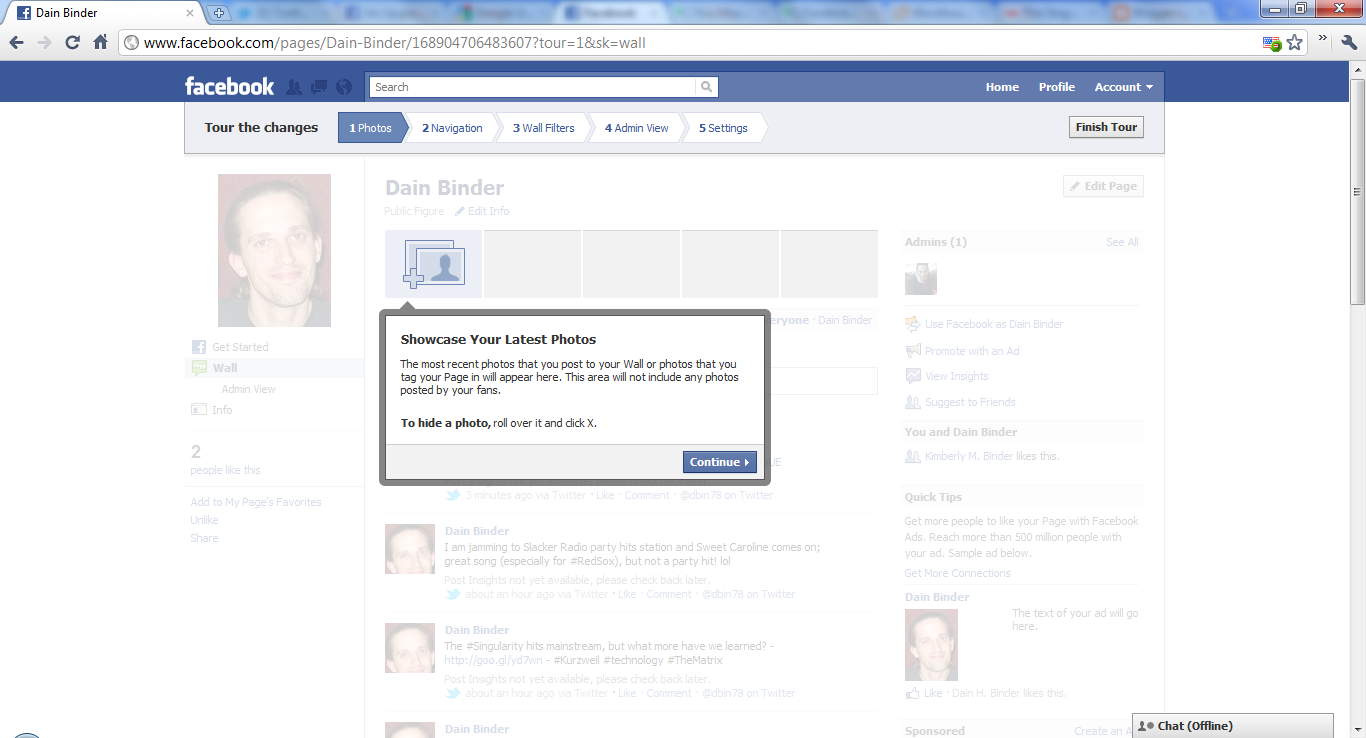
Facebook has updated their Facebook Pages giving new layout and controls as seen in the below tour. Some of these are long awaited, like being able to be your "page-self" when commenting, and some are familiar like the new picture layout we have seen on the personal profiles. (Click on any screenshot for a full view.)

Let the tour begin:

1) Showcase Your Latest Photos
The most recent photos that you post to your Wall or photos that you tag your Page in will appear here. This area will not include any photos posted by your fans. To hide a photo, roll over it and click X.


2) Navigation Where People Expect It
Navigation links are now on the left, just like on people's profiles.


3) Show the Top Posts on Your Wall
You now have two Wall filters. You can show posts by your page and top posts from Everyone, a new way for people to see the most interesting stories first. As an admin, you'll have additional filters for viewing posts on your page. To set a default filter for your Wall, go to Edit Page.


4) Use Facebook as Your Page
You now have the flexibility to interact with the other areas of Facebook as a page.

  • Get notifications when fans interact with your page or posts
  • See activity from the pages you like in your news feed
  • Like other pages and feature them on your page
  • Make comments as your page on other pages

To try this new feature, you can click the link here or go to Account above and select Use Facebook as Page.


5) New settings
You can set defaults for your email notifications and how you post to your page - as yourself or your page. You can also select which featured pages appear in the left column. To manage your settings for email and posting preferences, go to Edit Page and Your Settings. To select which pages appear in Favorite Pages, go to Edit Page and Featured.


Learn more - http://www.facebook.com/help/?topic=upgradedpages
Facebook's announcement - http://www.facebook.com/note.php?note_id=10150090729064822&id=10381469571
Upgrade your Pages - http://www.facebook.com/pages/status

Additional Reading: Facebook Timeline Privacy Settings