Showing posts with label Facebook. Show all posts

Saturday, May 12, 2012

TraitPerception - Crowd-Based Trait Measurement And Reputation

TraitPerception uses behavioral questions to determine your traits as rated by your LinkedIn or Facebook connections. By crowdsourcing these types of questions from your peers, friends, and family they are able to build an accurate view of how others generally view you.

The way the question are presented plays a pivotal part in the equation and truly sets TraitPerception apart from others in the same arena. You will notice that the questions are not simple yes or no questions and you are never asked to specifically select or type out a list of traits for an individual. It is much more situational and based on your direct and personal perception of the individuals.

Below are some sample questions where you would choose one of the five people presented that has the embedded characteristic.
  • Who might often feel discouraged?
  • Who has a more vivid imagination?
  • Who is most likely to probe deeply into a subject?
  • Who worries most about things?
  • Who is the quickest to understand things?
  • Who is less interested in other people's problems?

You can see how these questions get right to the point. It is nice because they probe your mind as well to make you think of traits you might not have thought of on your own. They are also worded is a manner that is non-confrontational because answering one about a group of five means almost nothing, but get a crowd to do that over and over and with their algorithms you have some powerful information. At least 50 questions need to be answered about a person from a minimum of 10 contacts before a percentile based trait report can be generated. You can almost relate it to an Amazon product review for people says co-founder Juan Cartagena.

The service is still very new and needs to gain a good following to make it relevant, accurate, and useful. Some of the uses could be for an employment application, interview, networking, team building, resume/references, dating, and online commerce. You can follow them on Twitter and Facebook. The TraitPerception team is Juan Cartagena (CEO), Borja Martín (Chief Dev), and José Ignacio Fernández (CTO). At this time you can either login and rank under your Facebook or LinkedIn account, not both; I hope it is enhanced in the future to connect the accounts. Try out TraitPerception and let us know what you think in the comments below.


Tuesday, January 24, 2012

Facebook Timeline Privacy Settings

Facebook has been rolling out Timeline for a while, and just announced it is making the final push. Over the next few weeks everyone will have it with no opt out option. The most frequent question I get is how to control the privacy. The controls are very granular, although it may be tedious, I want to show you every location to make an adjustment.

About - www.facebook.com/username/info (change "username" to yours)
  • Work and Education - Click edit; within this section you will see a small down arrow in the upper right corner. If you click on that you can define the visibly of your current and past jobs. That first one only controls your employment; further down on the right side there will also be controls for each education entry.
  • About You - First click edit, then you can control the privacy with the down arrow.
  • Basic Info - Click edit, then control the individual privacy for birthday, relationship, political views, etc. There are a total of six individual privacy adjustment in this section.
  • Living - Edit to control the privacy of your hometown and current city; separately.
  • Contact Info - Edit to change the privacy of every contact method.
  • Favorite Quotations - Edit, then press down arrow in the upper right to control the visibility.
  • Relationship or Family - Editing either will control both sections at once. You can not control individual family members; it is all or nothing.
  • Pages - If you are the administrator for any pages you can use the check boxes to control which are displayed on your profile.

Friends - www.facebook.com/username/friends
  • Friends List - Click edit to change the visibility of your friends list on your profile.

Photos - www.facebook.com/username/photos
  • Your Albums - Control the privacy of each folder using the little down arrow. Be sure to click "see all" to control all of your albums.

Likes - www.facebook.com/username/favorites
  • Favorites - Click edit to enter the change screen. Within there you can change the privacy of every section using the familiar arrow; be sure to "Save Changes" for every individual section.
  • Like - These are the pages you like. To change the privacy adjust "Other Pages You Like" from the section above.

Timeline - www.facebook.com/username
  • Favorites - Favorites are the small rectangle boxes near the top of your timeline profile page. You can click the little down arrow on the right to enter the editing mode. To remove one, hover over it, click the edit icon, then click "Remove from Favorites". To add one click the plus (+) icon on an empty rectangle.
  • Timeline - You can adjust every post shown in your timeline by hovering over it. You can edit, delete, or hide a post by using the icons in the top right corner (when you hover on it) and/or change the privacy by clicking the icon next to the date. I have found it is easier to use the Activity Log to do this.
  • View As - Underneath your cover photo on the right side is a down arrow. If you click on it, then click "View As..." you will see what your profile looks publicly to any user. Using the box at top left you can see how it look to a specific friend. To see how it looks to a non-Facebook user simply log out and visit your profile link.

Activity Log - www.facebook.com/username/allactivity

  • Activity Log - Here you can view and adjust every like, photo, comment, and share since you started using Facebook. To the right of every line item are two icons. The first controls the privacy of the entry; the second allows you to edit, hide, delete, unlike, etc.


  • Individual Posts - You set the privacy at the time of every post. Your last setting is the default for the next, so be careful if you switch between Public and Private posts.
  • Default Privacy - This controls the privacy when individual controls are not available on certain apps.
  • How You Connect - Control who can find you, send you messages, or write on your timeline (wall).
  • How Tags Work - Adjust who can tag you and set your "Maximum Timeline Visibility".
  • Apps and Website - Control what is shared with apps and websites and what they are allowed to do on your behalf.
  • Limit the Audience for Past Posts - Change all your past posts to be Friends only.
  • Blocked People and Apps - Add or remove blocked people or applications.

Simple, right? Not really! The best improvement Facebook could make is to have a single privacy toggle that will control/override/reset all the individual privacy controls. I do like having the control of each specific item, but it can be very confusing.

What's your take on the privacy controls? And, do you like Timeline better than your Wall?

Tuesday, September 27, 2011

Facebook's Auto-Sharing And What It Means To You

Facebook announced many changes last week, and over the weekend the chatter around the web and in the real world has focused on the privacy implications and information overload from their "auto-sharing" feature. There are many services like Spotify, Nike+ GPS, Foodily, and Words With Friends that are using this enhanced sharing. Lets take a look at what is going on and dispel some myths.

The one item that really needs to be clear to everyone is that you are in full control of what is shared, and who sees what is shared, on Facebook. The sharing is not automatic and needs to be specifically approved. With these new apps that connect using the Open Graph (Facebook's enhanced sharing protocol) there are new line items on the approval screens that we have become accustomed to. There could be new little check boxes to either check or uncheck, so be sure to read everything when connecting a Facebook account to an application.

You will see new questions about adding the activity to your timeline which encompass the news feed and ticker. This is where you approve/disapprove the apps access to share the activity. If you do share your activity you can further control who sees it through the privacy settings. The traditional public, friends, and friend of friends settings can be used as well as the lists and individual people, the option is even there to hide it from specific friends or lists. You have total control!

If you need to change your current settings head over to the privacy settings, edit settings for apps and website, edit settings for apps you use, then find the specific app and click edit. Once in there you are able to remove specific functions of it, change the overall viewing privacy, or completely delete it. If you want to take it off your new profile, once those are publicly launched, you can hover over it and select "remove from favorites" from the drop down menu.

On the receiving end, seeing all these updates can be just as annoying as the games. Luckily you have the "hide all by ..." option for these as well. I hope this clears up some of your questions and concerns. If not, please leave a comment below with your question.

Knowing what you know now, this video isn't so scary:

Sunday, September 25, 2011

Is Facebook Going To Start Charging A Fee?

NO! The rumor that Facebook is going to start charging a monthly fee because of the new profiles is completely false. The hoax continues to spread by user generated spam; please stop reposting it. Facebook has no need to charge a monthly fee with over $3 billion in annual revenue, of which $1 billion is profit. Their homepage answers the question for all to see if there is any doubt.


The messages making the rounds are:

FACEBOOK JUST RELEASED THEIR PRICE GRID FOR MEMBERSHIP. $9.99 PER MONTH FOR GOLD MEMBER SERVICES, $6.99 PER MONTH FOR SILVER MEMBER SERVICES $3.99 PER MONTH FOR BRONZE MEMBER SERVICES, FREE IF YOU COPY AND PASTE THIS MESSAGE BEFORE MIDNIGHT TONIGHT. WHEN YOU SIGN ON TOMORROW MORNING YOU WILL BE PROMPTED FOR PAYMENT INFO...IT IS OFFICIAL IT WAS EVEN ON THE NEWS. FACEBOOK WILL START CHARGING DUE TO THE NEW PROFILE CHANGES. IF YOU COPY THIS ON YOUR WALL YOUR ICON WILL TURN BLUE AND FACEBOOK WILL BE FREE FOR YOU. PLEASE PASS THIS MESSAGE ON IF NOT YOUR ACCOUNT WILL BE DELETED IF YOU DO NOT PAY

IT IS OFFICIAL. IT WAS EVEN ON THE NEWS. FACEBOOK WILL START CHARGING DUE TO THE NEW PROFILE CHANGES. IF YOU COPY THIS ON YOUR WALL YOUR ICON WILL TURN BLUE AND FACEBOOK WILL BE FREE FOR YOU. PLEASE PASS THIS MESSAGE ON, IF NOT YOUR ACCOUNT WILL BE DELETED IF YOU DO NOT PAY

Friday, September 23, 2011

Graphing The Timeline, A Facebook Opinion

Zuck at f8
The social war is in full effect and Facebook is digging in deep with it's recent changes. Today, I am pleased to have a guest post by Kevin Tampone, in which he talks about the updates.

I'll reserve full judgment on the (massive?) changes to Facebook until they're all in place and we can see how they work together, but I do have a few ill-advised, half-formed opinions.

First off, kudos to Facebook for not treading water. Google+ looks to me like the site's first legitimate challenger and the company is obviously not taking the threat lightly. Just speculating here, but adding the ability to consume content in real time with your friends could have been at least partially inspired by Google+'s Hangouts, no? On to some of the other headline-grabbing tweaks…

  • Gestures: I like this (that's not a pun). I especially like that third parties can transform pretty much any action word into a button. I'm in the news business so I'm hoping media outlets will take liberal and creative advantage of this. How about live online coverage of a presidential debate that allows the audience to "agree" or "disagree" with candidates in real time?
  • Subscribe: Again, this one gets a thumbs up and, again, it's largely because of my newsroom roots. This feature is a godsend for media types or anyone, really, with a strong Facebook presence. Clearly ripped from Twitter, but who cares? Now at least we can all keep tabs on what our congressmen are up to on Facebook without being forced to "like" them or, worse, be their friends.
  • OpenGraph: Thumbs down. I'm not a fan of anything that raises privacy red flags and this does. Apps will now need to ask permission to share stuff about you only once and then all bets are off. Personally, I'm cautious about what I post and the first thing I did when I joined Facebook was meticulously adjust my privacy settings. But I think I'm in the minority. Plenty of folks on the site don't realize that openness is the default position. That's not entirely Facebook's fault, but the company doesn't do enough, in my opinion, to guide users in this area.
  • Timeline: The concept is appealing, but I really want to see it in action. It also seems ripe for oversharing. I'll tell you one thing: No way am I going back and posting baby pictures up there. All that awkwardness is safely secured with people who are nowhere near Facebook.

Facebook Changes - What The Average Everyday User Needs To Know

Facebook announced a plethora of changes and upgrades over the past week and a half. The tech world is buzzing, developers are scrambling, and early adopters are testing things out.

What do I need to know, you ask?

There is no shortage of in-depth reviews and screen by screen analysis on the web and in print. This guide is for the normal everyday user; for my picture sharing parents, my messaging and farming wife, and all the other regular users reaching for the Advil bottle. Breathe a sigh of relief; it's not that bad!

Lists - Lists have always been there sitting on the left of your home screen. Most people don't use them, but Facebook hopes to change that with the improvements. The upgrade enabled lists to be automatically created for close friends, family, employers, schools, and geographical areas. Friends were added to each corresponding list if it was determined through your relationships and interactions that they should be there. There are suggestions for other friends that Facebook was unsure about that you can approve if you like, and then add anyone else you want. Lists are used for privacy when making status updates, uploading photos, etc. Instead of having the shared item visible to your friends or public, you can make it visible to your "Family" list. Using lists enhances your privacy by better controlling who can see what. The best part is if you want nothing to do with them, just ignore them, and no action is needed. You can continue on like you were before.

Subscribe - Subscribing is a new feature that is simply a way for you to subscribe to a non-friend's public posts. Their public activity will appear in your news feed and on the ticker (more on the ticker below). You must turn the feature on if you want to allow people to subscribe to your public posts (click edit settings on your subscriber page). This is a great way to follow what a person is up to without mutually friending them. As an example you can now "Subscribe" to Mark Zuckerberg; previously you would have gone to his profile to see his public posts. You are automatically subscribed to your, and any new, mutual friends. Please note that your subscription to someone is not private.

News Feed - The view has changed slightly. Previously we had the News Feed and Most Recent as two different viewing options. Now they are merged as one. At the top will be Top News as indicated by a grey triangle in the upper left area of the item. Top News will be your trending items or events that Facebook thinks you should see, followed by the chronologically ordered Recent Stories. As nice new addition is that when you have been logged off for a while you are greeted with New Stories above the Top News. It only takes a couple days to get used to the new format.

Ticker - The ticker is displayed in the top right section of the screen and is a rolling list of "light" updates. Each update is clickable and actionable within the ticker feature. This allows you to quickly like or reply to something without leaving your current page. Important to note is that no privacy or visibility settings have changed to add this. Essentially it just makes updates you already have access to easier to find and see. You can not disable your ticker updates from going out to other people, but you can block incoming ones from friends if you want. Updates from apps using the Open Graph will show up in the ticker also. Many people will be talking about the privacy implications of the Open Graph, but just read all pop-ups before you grant any apps access to your information and you will be fine. Let me know in you comments below if you have any questions or concerns about that. (Read more about Facebook's auto-share feature.)

Timeline - Your profile is being redesigned to be a beautiful timeline. It will be much more historically robust, aesthetic, and actionable. I hear it could be a bit of a project to set it up initially. The video below is an introduction to timeline. Enjoy the (free) upgraded Facebook!


Be sure to also read, "Graphing The Timeline, A Facebook Opinion".

Thursday, September 22, 2011

Facebook's Timeline And Open Graph

Facebook's f8 Developer Conference is still in session, but for now, here are two videos about their biggest new features; Timeline and Open Graph.


Watch Facebook's f8 Developer Conference Live Stream

f8, Facebook's Developer Conference, goes live today at 12:30 PM EDT (9:30 AM PT). There are sure to be many major announcements at the 2011 f8 conference, that could turn out to be their most impactful event yet. Watch them unfold right here! The opening keynote address with Mark Zuckerberg and Bret Taylor is set for 1:00 with breakout sessions following and going until the 7:30 closing remarks by Chris Cox. You can chat about the event below the live feed and, for today only, you will see a feed of #f8 Tweets in the right column; everything you need in one place!

RSVP on Plancast, or save the event to Google, Outlook, or iCal.


Tuesday, August 9, 2011

What Did You Do Last Year?

Do you wonder what you did on this day last year? Sometimes I do; if not just for the fun factor. If you consider Facebook your life's diary there is a good chance the information is there. Until now you had to click "Older Posts" over and over and over on your Wall to finally get to last year. PastPosts changes all that.

Released a couple months ago PastPosts is a simple Facebook app that taps in to your posts to see what you were up to last year. Every morning it sends you an email letting you know what you were up to at this time last year. The team (bdotdub, jwegener, and mattraoul) that created this previously put together 4sq&7yearsago to do the same thing with Foursquare.

A blast from the past can be fun, and sometimes sad or scary. We are our past so it is good to remember.

Tuesday, July 12, 2011

Facebook for Every Phone Launches

It was only a matter of time for Facebook to make use of its acquisition of Snaptu. The technology allows them to offer a version of Facebook on over 2,500 different phones that are not in the "smart phone" category. The Facebook for Every Phone app will be available on Java-enabled phones today, with it being available on other handsets later. This move will vastly expand their mobile engagement and therefore use of the social network in general.

You can download the Facebook app by visiting m.facebook.com and scrolling down to the download link, or by going directly to d.facebook.com/install using your mobile browser. You can also find it in many app stores like GetJar, Appia, and Mobile Weaver. Data cost are involved, but Facebook has work with many carriers to allow for a 90 day free trial (more info).


Stop treating Google+ like Facebook

Christina Trapolino wrote an excellent post about how to get the most out of Google+. I thought everyone should read her insightful thoughts. Below is the post in its entirety; used with permission.

Google+ Tip for the day: Stop treating Google+ like Facebook. 
When I got my Google+ invitation, I was already itching to shed my Facebook profile. I still feel that way, but I’m starting to realize something really surprising (at least for me): I don’t think Google is my Facebook stand-in. I think Google is far more than a measly “social network,” and that’s why some of my Facebook friends who are migrating over right now seem to be, as they say on the Internet, “doing it wrong.” 
I've been a devoted Googlephile for many years, so if Google wanted me to use G+ instead of Facebook, it was gonna happen -- unless they really goofed it up, of course (I'm still not entirely over my breakup with Wave, Google -- but at least I've stopped leaving those creepy voicemails, right?). The push and pull factors were there. They were obvious: Facebook is for “moms” and spam robots -- Google was going to be my new social network. 
But something didn't feel quite right about treating my Google+ profile like my Facebook profile, nor treating my Circles like the Facebook social groups I wished I'd always had. There was content everywhere, written by people I’d heard of -- and many I hadn’t. Something about this space was very different than anything Facebook has ever allowed me to experience. It felt like something else, something... bigger, maybe more important. Something collaborative, perhaps. How very Google! 
My friends, however, don’t seem to be having the same Google+ experience I am. My tendency so far has been to add as many people with as many interesting views as possible to my Circles, and then to read voraciously and respond all over the place. Meanwhile, my real-life friends are complaining that there’s not enough content to appease them, and I’m the only one dominating their Streams. Why is this happening for them? I think it comes from a fundamental set of expectations about moving from Facebook to Google+. People are treating their Google+ accounts just like Facebook accounts. And I think that’s a doomed approach. 
Here is how I think Google+ can be most fully enjoyed and utilized, at this early stage: 
Think about what you use Facebook for. If it’s for keeping up with old friends and for keeping up with current, local friends, great. You can use Google+ for that, and it’s definitely got a leg up on Facebook for filtering content. 
Interact with content created by users you don’t know personally. If you don’t follow people you don’t already know, you’re going to get bored, and not just because your friends aren’t all here yet. You’ll get bored even after they’ve all arrived. Why do you think Facebook started implementing games and applications? Well, to make money, obviously, but what was the draw for the userbase? I’m willing to bet Facebook figured out that simply reading your friends’ thoughts all day long gets old, and let’s be honest: very few of us have enough friends with enough interesting posts to keep us engaged. 
If you like the social games on Facebook, well...you’re not really my target audience. Sorry. For the rest of you -- if you don’t like how Facebook allowed third party junk to start bombarding you with game requests and access to your information, embrace its absence here so far!

I realize that at some point, developers may come up with cool ways to implement games on Google+, but I expect that Google will have learned from the clunky, disorganized, and downright invasive way developers approached this in Facebook. And the best way to keep Google+ rich in content and devoid of lame, invasive apps is to let go of your old ideas about what it means to be on a social network. 
(Copyright 2011 Christina Trapolino)

I was very impressed with this observation, and it is such a valid point. Many people do try to "Facebook" on Google+. The following, meeting, and conversing aspect is new to many users. Anyone that uses (reads or writes) on Twitter, micro blogs (Tumblr, Posterous, etc.), websites, or forums is at a great advantage to jump in and start +'ing. If you fall into that group, or just "get it" be sure to help out your friends and family to experience everything they can from of G+.

Fun fact: Google does not use the term "social network" in anyway to describe Google+. You can't even find it mentioned in their entire help section!

Saturday, July 9, 2011

Your New Social Hub

Google+ is not only a new social network, it can also be turned in to your main social destination. With two new Chrome extensions you can access your Twitter stream with full functionality and your Facebook news feed with the ability to update your status. Both feeds are inserted in the page to allow seamless switching between all three.

EDIT: Some questions over the security of these extensions have emerged; proceed at own risk.


This format will come in real handy for people that are looking to transition away from Facebook and/or Twitter. There will be a transition period until most of your friends, family, and contacts make their way to G+. On the other hand, if you intend to maintain a presence on all three networks you can do that with ease using these extensions.

They are Google+Facebook and Google+Tweet. I have found it is best to install the Facebook one first and set it up, then install Twitter. (The Facebook extension is not an approved Chrome app; proceed with caution.)


Wednesday, July 6, 2011

Facebook's "Awesome" Launch Failed (Skype Video Chat Arrives)

In the days following Google's limited launch of Google+ Facebook and Mark Zuckerberg said it was planning to “launch something awesome” on July 6, 2011. It looked as if the battle of the social networks was about to go toe to toe.

Speculation was that Skype video calling would be integrated with Facebook chat. Many people also thought there was something else top secret (and awesome) that was going to knock down G+ just as it launched.

Nothing more than one on one video calling, powered by Skype, was announced. That's right, the technology that has been around for many years is being brought to Facebook. It is certainly good, but not even close to being something "awesome". I was disappointed.

See you in Hangouts!

Tuesday, March 22, 2011

How To Follow News And Stories Online Without The Overload

With everything I read being online I have had to become very efficient in the way I manage and interact with news and articles. When you replace your local TV news, the national news, magazines, newspapers, trade publications and everything else with the digital world you can quickly become buried in a mountain of unread stories. The number of applications and website claiming to organize all this can add to your anxiety. News is generated from hundreds of sources around the web and going to each one is impossible.

What can you do? The most important things are organization and non-duplication. You do not need to see the same story in three different locations just because the source publishes to all of them. If you follow my blog you should pick the one source that works for you; not all five.

Lets run through the primary tools I use to consume the news:

1) Twitter - This should be used for your breaking news and important resources that are time sensitive. It is best to keep the number of accounts your follow to under 100. Anymore than that you will be missing news because you can not keep up. Don't forget; just because you are not following them on here does not mean you can not follow them somewhere else. If you are following over 100, try to find some of your less urgent sources and track them another way.

2) RSS Feed Reader) - RSS stands for Really Simple Syndication and the feed is usually designated by an icon like this RSS. I have found it to be the number one way to read and organize my information intake. You are able to follow major news websites, blogs, and pretty much any website that posts stories and updates. You can even follow news aggregators like Google News so that you do not have to go to the site directly. Just look for the RSS icon at the bottom of the page you are on to find the feed (this is the one for Top Stories). Keep in mind not to subscribe to any sources you already follow on Twitter. Within any reader you can organize your feeds and I suggest you do so to group subjects and interests. Don't be afraid of clicking the "mark all as read" button; if you have over 500 items to read click the button to get a fresh start. The sooner you realize that you can not read everything the happier and less stressed you will be.

3) Facebook - My news here is my friends and family only. If I like pages I hide them from my news feed to avoid information overload as things I like I already read on Twitter or in Google Reader. If you like getting your news here that is fine of course, but don't also follow it on Twitter or subscribe by RSS. If I find a compelling post or article I want to comment on from another source I can go to that page on Facebook to find the story.

4) Email - It can't be beat for daily digest emails and is an excellent way to control what information you get. You can even have some websites email you the stories instead of subscribing via RSS. Depending on the sources email frequency you can use email for urgent or low priority news like opinion articles. One thing I like to do is to get an email every eight hours from Summify. Summify scans my Twitter, RSS, and Facebook accounts to find the most important stories and is a easy way for me to ensure I do not miss important stories.

5) Buzz - I check it once or twice a day for the comments. The Buzz crowd is a insightful and thorough group of commenters. Most of the stories I would have already seen because 99% of the post are imports from Twitter and blog RSS feeds.

Happy reading! Do you consume news and information in a different way? Let everyone know what works for you in the comments section below. I am always trying new applications, extensions, and websites that claim to be able to organize the information better, but I have not been able to find one that improves on what I do above. Have you?

Tuesday, March 8, 2011

Facebook Scares and Annoys Me Sometimes (Thoughts and the Future)

Why? Because it is no longer a website; it has become a portal to a intranet on the internet that has tentacles reaching to every website. It is the overlord, the walled garden, and the Grand Poobah of the world wide web.

WWW2? Facebook's in-webpage world is vast. You can play games, watch movies, spend money, share photos, upload videos, and so much more. AOL 2.0 internet access is rearing its head under the code name of Facebook.

Websites? When was the last time you saw a commercial directing you to a website? They seem to all direct you to their Facebook Page and ask you to Like them. The consumer web is moving inside of Facebook's control. Companies still have websites of course, but that is no longer the destination for many. Scary.

Spam? I spend to much time blocking things in my Facebook news feed. All the Likes are the equivalent of spamming your friends with emails promoting products. I am starting to feel like I am on Myspace. Oh, and those applications that allow you to create something artistic out of the new profile image layout are annoying! Those gaming application can drive you crazy! I don't need to know every single thing my friend does.

Comments? They recently rolled out their commenting system that can be incorporated into any website. This further ties you to Facebook, feeds their coffers, and fills your news feed. I will be sticking with Disqus here.

Movies? You can now rent movies on Facebook and watch them in FBland. Joy, more stuff to see and know about your friends.

TL;DR? Facebook is getting to big and should slow down to focus on improving. A revolt is looming. Just like the exodus from Myspace to Facebook there will be one from Facebook too. Until then, see you on Facebook. Please hurry up +1.

Saturday, March 5, 2011

Play Angry Birds on Facebook

That's right the ever addicting birds from Android and iPhone are coming to Facebook next month. The Angry Birds port to over 600 million Facebook users will have “completely new aspects to it that just haven’t been experienced in any other platform” says Rovio CEO Mikael Hed.

To me this means it could have sharing and strategy features like Farmville that will immerse you and your friends in the game. If not, it will still be a popular game and would certainly be at the top of the rankings. If you head over to the Angry Birds page on Facebook you can "Like" it to keep updated on the progress.

Rovio has hit gold with the Angry Birds franchise and bringing it to every platform spells success. If they can tie in everyone's game play across all the platforms by linking your Facebook game to your Android one, or any platform combination, they will succeed beyond their dreams. Actually they already have with cartoons, plush toys, movies, and so much more.

The pigs will be coming in force to Facebook! Hed says "the pigs will have a more prominent role".


Did you see Conan play life size Angry Birds yet? If not, check it out below.

Sunday, February 13, 2011

Facebook Chrome Web Store App

The official Facebook Chrome Web Store app is out and taking names... well, not really. As of right now version 1 only directs you to a link with "ref=cws" so that they can track who comes their way from the app. It seems it should do something more considering that it could have deep integration into every webpage. Their Help Center does not even find a mention of the Chrome Web Store.

I will be waiting for the next version. At least for now I have a sweet Facebook icon on my new tab screen. Party.

Thursday, February 10, 2011

Facebook Pages Upgrade Tour

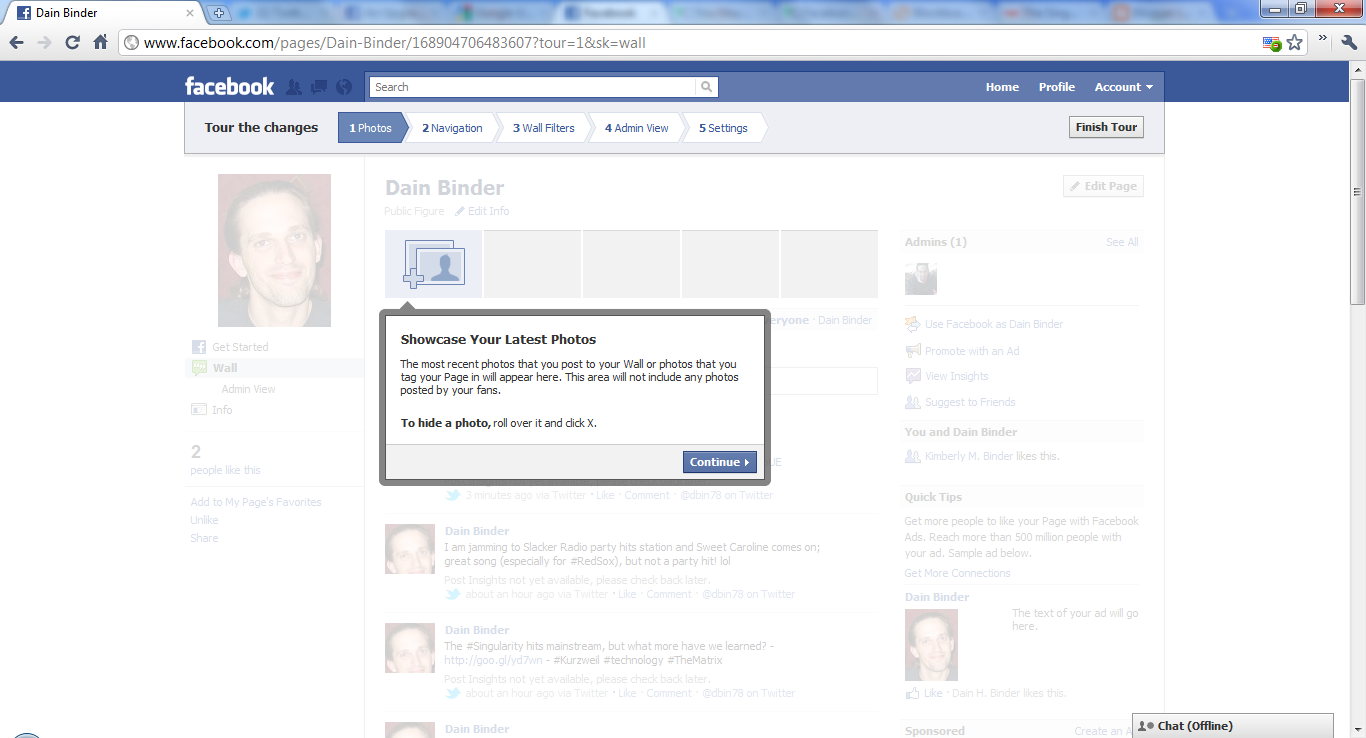
Facebook has updated their Facebook Pages giving new layout and controls as seen in the below tour. Some of these are long awaited, like being able to be your "page-self" when commenting, and some are familiar like the new picture layout we have seen on the personal profiles. (Click on any screenshot for a full view.)

Let the tour begin:

1) Showcase Your Latest Photos
The most recent photos that you post to your Wall or photos that you tag your Page in will appear here. This area will not include any photos posted by your fans. To hide a photo, roll over it and click X.


2) Navigation Where People Expect It
Navigation links are now on the left, just like on people's profiles.


3) Show the Top Posts on Your Wall
You now have two Wall filters. You can show posts by your page and top posts from Everyone, a new way for people to see the most interesting stories first. As an admin, you'll have additional filters for viewing posts on your page. To set a default filter for your Wall, go to Edit Page.


4) Use Facebook as Your Page
You now have the flexibility to interact with the other areas of Facebook as a page.

  • Get notifications when fans interact with your page or posts
  • See activity from the pages you like in your news feed
  • Like other pages and feature them on your page
  • Make comments as your page on other pages

To try this new feature, you can click the link here or go to Account above and select Use Facebook as Page.


5) New settings
You can set defaults for your email notifications and how you post to your page - as yourself or your page. You can also select which featured pages appear in the left column. To manage your settings for email and posting preferences, go to Edit Page and Your Settings. To select which pages appear in Favorite Pages, go to Edit Page and Featured.


Learn more - http://www.facebook.com/help/?topic=upgradedpages
Facebook's announcement - http://www.facebook.com/note.php?note_id=10150090729064822&id=10381469571
Upgrade your Pages - http://www.facebook.com/pages/status

Additional Reading: Facebook Timeline Privacy Settings